UI/UX Design — ‘20
MUSE
Personalized Makeup App

TYPE
Creative Project
TEAM
Hoang Quynh
Phong Dien
Nhung Bui
SCOPE
UX Researcher, UI Designer, Prototyping
PROJECT OVERVIEW
Personalized makeup ideas, tutorials & inspiration
Created as part of a 4-week UX/UI design assignment at RMIT University, MUSE is a concept mobile app that delivers personalized makeup recommendations, tutorials, and creative inspiration for beauty enthusiasts. It also doubles as a creative community, where users can explore looks, share their own, and contribute tutorials to inspire others.

USER INSIGHTS
The Challenge
Choosing a daily makeup look is overwhelming. Many users default to the same styles due to lack of time, confidence, or inspiration, especially when unsure if new looks will suit them.
Target Users
Our research began with a 2-day survey of 120 makeup enthusiasts on social media groups. We discovered a common challenge: while many expressed a desire for new styles, they often felt stuck in old routines due to work demands or specific facial features.
This directly shaped our understanding of our target users:
-
Busy professionals who need quick, reliable makeup suggestions,
-
And enthusiastic hobbyists eager to explore, experiment, and share new looks.


PRODUCT INSIGHTS
User Pain Points &
Product Responses
"Too many options make it harder to decide"
— Our Solution: Simplify routine through personalized suggestions.
"I don't know if a tutorial fits my features"
— Our Solution: By performing a face analysis at the start of the user journey, we provide suitable makeup recommendations and build confidence through tailored, guided tutorials.
"I want to use the products I already own"
— Our Solution: By allowing users to log their owned products, we can provide tailored suggestions and foster a community where users can share and discover looks using common items.

"I don't know if a tutorial fits my features"
Our Solution:
Use face analysis at onboarding to recommend looks that match the user’s unique facial features, increasing relevance and user confidence.


"Too many options make it harder to decide"
Our Solution:
Simplify decision-making by offering curated full-face or feature-based suggestions tailored to each user’s preferences and habits.


"I want to use the products I already own"
Our Solution:
Let users log their existing products and generate looks using them, while exploring tutorials and shared routines from others with similar items.

PRODUCT INSIGHTS
User Pain Points &
Product Responses
IDEATION
Key Features
1. Personalization Suggestions
Use facial scan analysis to recommend suitable styles
2. Step-by-step Tutorials (Full-face makeup look)
A guided routine for each full-face makeup look
3. Look Assembly (By-feature makeup look)
Combines selected feature-based styles into one cohesive final look
4. Community Sharing
Users can review, remix, and post their own looks
Other
PROJECTS

Wireframes
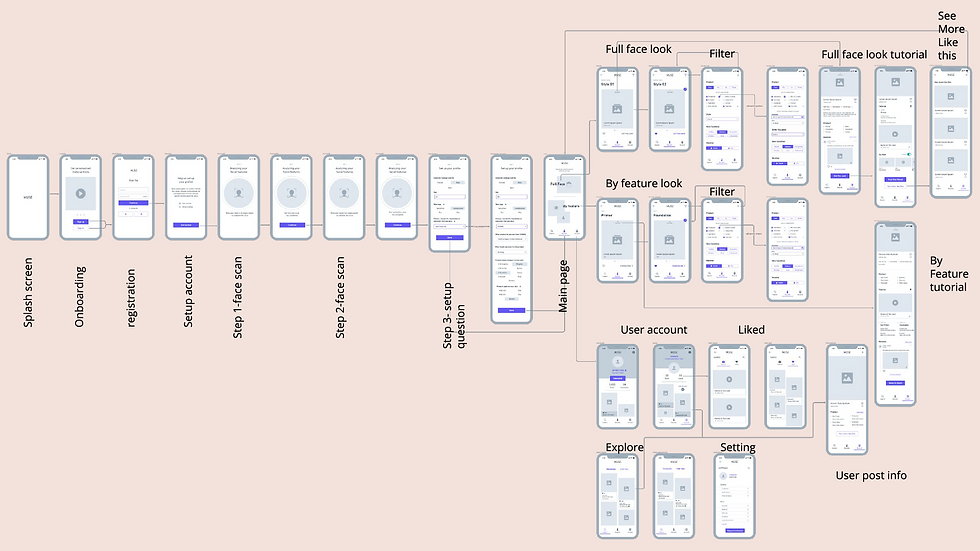
We used Whimsical to design mid-fidelity wireframes that outlined core flows and key UI elements, helping us validate layout and interactions before moving into visual design.
BRINGING TO LIFE


Styleguide
The name MUSE reflects both creativity and confidence,
It also works as an acronym:
Make-Up Suggestions for Everyday/Everyone, highlighting the app’s versatility and inclusivity across skill levels and routines.


Art Direction
'26

Suntory Tea+ Masterbrand Revamp
A refreshed TEA+ brand world where Japanese craftsmanship meets playful everyday chaos, adding more An Lành and Refreshment to the day.
Art Direction
'23-24

Vinamilk Susu Hero Branding Animation
Building a playful branded universe that entertains kids with fun and meaningful environmental lessons
Art Direction
'23

Love Your Lungs CSR
Crafting a heartfelt launch film and campaign visuals to promote early lung cancer screening across Vietnam
Art Direction
'23

On-rion Playlist
Revamping Orion’s YouTube channel with a playful mascot and an engaging mix of short- and long-form content for teens
Graphic & Motion
'25

OUCRU AI-Powered Tetanus Monitoring
Illustration and Motion design for OUCRU's explainer on AI-powered tetanus monitoring
Game Design & Development
'21

DeArtective Game
CONCEPT PROJECT /
A detective-style game that invites player to explore, learn, and honor the stories behind three young heroines, immortalized in paintings
UI/UX Design
'20
MUSE Personalized Makeup App
CONCEPT PROJECT /
Get the looks and products selected for your facial features just with simple swipes
Graphic & Motion
‘20

Eyesight for Children
Developing visual materials and short animations to bring eye health awareness to kids across Vietnam
Game Design & Development
'20

The Lost Light Game
CONCEPT PROJECT /
A whimsical 2D platformer game of finding fragmented lights & collecting lost hearts
Graphic & Motion
'19

Mindfulness Meditation
CONCEPT PROJECT /
An abstract motion piece visualizing the rhythm of mindfulness
